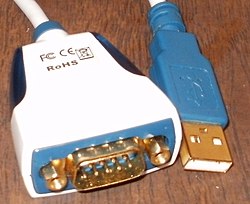
COM (communication port) [1] [2] is the name of the serial port interface on PC-compatible computers. It can refer to physical ports and to emulated ports, such as ports created by Bluetooth or USB adapters.
COM (communication port) [1] [2] is the name of the serial port interface on PC-compatible computers. It can refer to physical ports and to emulated ports, such as ports created by Bluetooth or USB adapters.
COM port came with the original IBM PC. IBM called the four well-defined communication RS-232 ports the "COM" ports, COM1 through COM4. In BASICA and PC DOS these ports can be opened as "COM1:" through "COM4:", and all PC compatibles using MS-DOS used the notation.[ citation needed ] Most PC-compatible computers in the 1980s and 1990s had one or two COM ports.
By 2007, most computers shipped with one or no physical COM ports. Today, few consumer-grade PC-compatible computers include COM ports, [3] though some include a COM header on the motherboard. [4]
After the RS-232 COM port was omitted from consumer-grade computers, adapters from remaining interfaces such as PCI Express and USB could be used to install a COM port. One supplier chips for external USB-to-UART serial adapter cables is FTDI.[ citation needed ]
The COM ports are interfaced by an integrated circuit such as 16550 UART. This IC has seven internal 8-bit registers that hold information and configuration data about which data is to be sent or was received, the baud rate, interrupt configuration and more. In the case of COM1, these registers can be accessed by writing to or reading from the I/O addresses 0x3F8 to 0x3FF.
If the CPU, for example, wants to output information on COM1, it writes to I/O port 0x3F8, as this I/O port is "connected" to the UART IC register that holds the information.
| Designation | I/O port | IRQ |
|---|---|---|
| COM1 | 0x3F8-0x3FF | 4 |
| COM2 | 0x2F8-0x2FF | 3 |
| COM3 | 0x3E8-0x3EF | 4 |
| COM4 | 0x2E8-0x2EF | 3 |