Media center applications started appearing during the early 2000’s as large screens and DVD players were becoming mainstream, and they provide a solution for personal computers to be used as a front-end interface for large screens. They are the main software application of home theater PCs and can also be seen on regular computers, mini PCs, or digital media players.[2][3]
MythTV, usually used as a live TV backend, is also a media center application in its own right.
Nowadays, features these applications usually have are incorporated into game consoles, digital media players, and some smart TVs combining local content with streaming content. Digital media players include the NVIDIA Shield, Amazon Fire TV, Roku, and Apple TV. They have largely replaced media center applications for most people, though some users still use these applications for added flexibility or use cases such as enhanced live TV or local library functionality.[13]
Overview
Media center applications are multimedia applications for digital media and combines many media functions, such as live TV playback and media browsing, and are designed to be displayed on a large screen through a 10-foot user interface. They allow users to list and search media, play media, and control the application using a remote.[1]
The applications are usually run on computers or digital media players and provide for one’s media preferences. They are the main software application of home theater PCs other than operating systems like Windows and are defined by their dedicated use for large screens like televisions or projectors, and their combination with the application.[2][3]
The interface of media center applications is a 10-foot user interface that’s designed for large screens for easy viewing from a distance, such as a couch or a seat. The content and text are large and the interface is fullscreen. In some applications such as Kodi[14] or MythTV,[15] the user interface is fully customizable and can install new themes or sound effects which let users customize their experience.
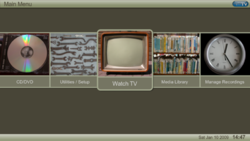
They usually start with a home screen with buttons to the types of media and services, and can contain widgets that show information locally or from the internet such as what’s new and trending or continue watching. Home screens can be customized on some applications to fit one’s preferences and interests.
Media center applications usually present the content in unique views such as thumbnail, list, film banner, or more while browsing content locally or online. The content can also be sorted by rules such as name, date created, genre, and more. The interface can also include a search box within the folder, or globally for searching content.
Media libraries
Most media center applications allow users to curate and organize their media library from a variety of sources, local or online. Common local sources include photos and videos taken from digital cameras or phone cameras, photos and videos downloaded from the internet. musicripped from CDs or downloaded from the internet, and movies and TV shows ripped from DVD or Blu-Ray discs, or recorded from a stream for saving. Sources online can include media from streaming services such as YouTube, live TV and its guide data, RSS feeds, and more.
Media center applications can play music and video playlists and can show the playback queue on what’s coming next. Some applications can also create playlists by selecting the media using a remote then saving the playlist. Other applications can also play external playlists within a local network or online, playing back items that can point to a file within local storage, or stream within a local network or online.
Some applications can connect to an external media server that serves them files and information such a network-attached storage through the local network or, if configured, remotely.[2]
Playback
Media center applications are designed with media playback and it’s controls are designed for large screens. The basic playback functions such as play/pause, seeking by any amount of seconds, and volume control are included in the interface or remote. Other playback functions include displaying the queue, speeding up or slowing down footage, controlling photo or video slideshow playback, and stopping.
Most applications can also play and record live TV through a TV tuner card, a capture card, IPTV, or a backend such as MythTV.[5] They can get the guide data and usually allow users to set the exact time when to record based on the guide data, or manually. The media center then records the program then saves it as a video to the library.
Some applications can gain the ability the ability to curate, display, and stream content from services such as YouTube or Spotify through official or unofficial add-ons. One downside however, is that it may require some knowledge to obtain the API key if the service does not officially support the media center, or the API key is unavailable.[16][17] In these cases, it is inconvenient for the average person and the application’s growth is halted. If an official app is installed outside of the media center application, it’s usually easier to use that instead.
With their main interface being designed for large screens, media center applications are usually controlled by remotes from a distance, such as a living roomcouch or a home cinema seat. The use of compact remotes instead of larger forms of input, such as a mouse or keyboard, makes it possible to control the interface with a single hand.
Many media center applications support the use of smartphones as remotes, and many smartphone applications have been created to control the media center applications. Kodi, MythTV, and JRiver Media Center has their own respective smartphone apps for remote control; Kore, MythMote, and JRemote.
Kore is an Android app made by the same developers as Kodi, and is designed to control Kodi with extra features such as viewing information on what’s playing on phone screens, managing playlists, and wake-on-LAN functionality for powering on the hardware with Kodi in it.[23] An official alternative for iOS devices is Official Kodi Remote.[22] MythMote is an Android app for controlling the front-end interface of MythTV,[5] and JRemote can control JRiver Media Center and browse, search, and play through JRiver’s media libraries on the phone screen.[24]
A number of third party remote applications for smartphones have also been created, such as Yatse, designed to control Kodi and Plex Media Server and also has a swipe gesture control mode, and allows users to browse and search through the media center application’s media libraries.[25]
Features
Media center applications are software applications dedicated for digital media and can have a lot of features included built-in, or have new features added by add-ons. A media center application can have the following functions:
Create and manage a media library from folders, playlists, and online content
For operating systems that weren’t made for large screens in mind, such as Windows or MacOS, they provide a solution for the devices running these OS’s to be used as a powerful front-end for a large screen. They also add and enhance functionality to devices like the Fire TV.
This HTPC from the 2000’s, a Gateway FMC-901X, came with Windows XP MCE pre-installed and included a WMC remote and it’s receiver. It also has some buttons and a display on it’s front.This HTPC has a diverse selection of ports on it’s rear side.
Computers may use a long cable like HDMI to serve a large screen inside or outside a room while still maintaining desktop functionality on a desk, be placed near a large screen or a projector for easy cable routing, or be bought for this purpose. On normal computers, TV tuner or capture cards expand a computer with local live TV playback and recording functionality, and optical disc drives enable the computer for disc playback.
Computers can be solely dedicated for use in a living room with a large screen or a home cinema. Such computers are called home theater PCs (HTPCs) and are defined by their dedicated use for large screens and their combination with the application. They can come in a variety of form factors, such as a mini PC form factor, and they can also be on low power, saving electricity in the long run.[2][3]
Some HTPC’s nowadays or those during the 2000’s such as those with Windows XP MCE may have unique features such as bundled remotes and receivers, a diverse selection of ports such as DVI or RCA, large hard disk drives, extra slots for more hard disk drives, built-in volume sliders, or built-in displays for information such as volume alongside the typical TV tuner cards and optical disk drives.[28][29]
Media center applications provide a solution for computers to be used as a front-end and can take advantage of a computer’s processing power to display advanced user interfaces with lots of widgets, advanced music visualizations, display and transcode codecs such as H.265 without stuttering, emulate video games, or add shortcuts to OS programs such as Steam Big Picture or other programs within the application.
On Windows, it is possible to sign in automatically and boot directly into a media center application using Registry Editor[30] and Task Scheduler[31] respectively, bypassing File Explorer, making it more seamless if the computer is intended for that purpose.
Game consoles
Netflix for the Xbox 360 allowed users to watch content from the instant queue that was added from computers logged in to the same account.
Game consoles, once exclusively used for playing video games by the 1990’s, has expanded with media capabilities such as using the optical drive for playback, storing local media on disk or on an external flash or hard drive via USB, displaying the media in a 10-foot interface, playing music in the background while a game is playing, and more.[33] Apps such as YouTube, Netflix or Spotify enables consoles for streaming from said services officially.
Consoles such as the Xbox 360[34][35] and the PlayStation 3[36] even has advanced music visualizations that take advantage of their processing power; the former console’s visualization is called Neon, and the PlayStation 3 and Wii includes Photo Gallery[37][38] and Photo Channel[39][40] respectively for the viewing and organization of home photos and slideshow playback, the former of which can create albums and organize by face, scene, and more, and the latter of which is preinstalled and can display home video.
Game consoles have most features of a media center application already included besides live TV, but some consoles such as the Xbox One are compatible with some media center applications like Kodi, which expands their functionality.[41]
Digital media players are compact and low-power devices which can run from a TV or projector’s USB outlet. They are usually meant for media streaming from services such as YouTube, Netflix, or Spotify, but can also have local media functions built-in. They are faster and more powerful than a smart TV, but less powerful than computers and game consoles, and are easy to setup, making them convenient for most people compared to computers.[citation needed]
Digital media players can have an app store which lets users install apps that expand its functionality. Some app stores can also have dedicated media center applications such as the Plex app[10] available to install. Other digital media players like the Fire TV can install apps like Kodi[42] outside of it’s app store.
List of media center applications
Since the early 2000’s, various media center applications have been released for various purposes and operating systems. Applications such as Windows Media Center and MediaPortal are exclusive to a single operating system, while others such as MythTV and SageTV have a focus on live TV functionality.[1][2][43]
MediaPortal is a free and open-sourceWindows exclusive media center application that started development in 2004 and left beta status on December 2008,[44] and is often considered as an alternative to Windows Media Center. MediaPortal has many functions including internet radio and live TV playback and recording, music visualization, home photo and video slideshow playback, DVD and Blu-Ray playback, RSS feed aggregation, and displaying weather forecasts. It is compatible with Windows Media Center remotes and pressing the center green button opens MediaPortal.[20][45]
It presents the content on it’s fully customizable 10-foot interface and has many skins to install,[46] and plug-ins expand MediaPortal’s functionality in a variety of ways, including scraping movie and TV show information from a database, syncing play history with an online service such as Trakt.tv, streaming from online services, displaying RSS feed information, and more, though there are more themes and plug-ins available for MediaPortal 1 than MediaPortal 2.[9][47][48][49][50]
The Confluence theme was the default theme for Kodi since 2009 before version 17, Krypton, released in 2017.
Kodi (formerly XBMC) is a free and open-source media center application originally created as a homebrew mod for the original Xbox in 2002, that expanded to multiple platforms including Windows, Fire TV, or Linux. It has support for many remote control options including smartphones via Wi-Fi, game controllers, receivers for many remotes, and more.[19] Kodi has robust media library organization capabilities[52][53] and supports many codecs out of the box. It can play photos, videos, music, movies and TV shows, and live TV.[4]
Kodi has a diverse library of add-ons that expand the application’s features due to its open-source nature. Add-ons include, but are not limited to: movie and TV show information scraping, live TV clients, weather forecast display, extra remote control options, or music visualizations. Add-ons can provide streaming from services such as YouTube[16] or Spotify,[17] though this usually requires an API key due to no official solution from said streaming services.[54]
The user interface is fully customizable and many themes have been created for Kodi. Users can download and install custom themes and sound effects that change the look and feel of Kodi, and some themes come with built-in options to customize the theme by adding or removing sections or widgets, changing the layout of the theme, or changing the background dynamically. Themes can change the views of content to many forms such as film banner view or list with information view.[14]
The Plex app is a cross-platform multimedia and media center application commonly used as a front-end for a Plex Media Server back-end for the display and playback of photos, videos, music, movies, and TV shows, but it also supports ad-supported movie streaming, live TV playback and recording from many channels, displaying movie and TV show information and where it’s streamed, displaying newsfeeds, and combines local content with online content in the Plex app.[55][56] Some features such as live TV are only available with a paid Plex Pass subscription or lifetime license.[57]
The MythTV frontend’s former user interface, Blue, only supported live TV functionality around 2004 and has since been replaced.
MythTV, primarily used as a live TV backend, is a free and open-source media center application and digital video recorder software released in 2002.[6] MythTV has a backend DVR solution and a frontend solution and can either be both installed on the same hardware, or be installed separately in different hardware.
MythTV has many live TV features, including rewinding, automatic commercial skipping, video capture from unencrypted sources, and more. The frontend’s user interface is fully customizable[15] and also features media library organization. It can display photos, videos, music, movies and TV shows, RSS feed information, weather forecasts, and more through optional modules.[58][59] MythTV can be controlled by smartphones via an Android app called MythMote or other remotes.[5]
JRiver Media Center is a paid multimedia application that also has a 10-foot interface called Theater mode. It has a comprehensive list of settings which greatly expand its capabilities, and skins for Standard or Theater mode customize the interface. JRiver Media Center has many views for Standard and Theater mode separately, such as list, jukebox, thumbnail, showroom, and more. It can be controlled by remotes through a receiver, or by smartphones through its associated JRemote application.[24]
JRiver Media Center has a wide variety of use cases, including photo and video organization and slideshow playback, music organization and tag management, movie and TV show information aggregation, independent media playback to multiple outputs, playing podcasts or internet radio, streaming from the local network, and more.[11][60]
NextPVR is a personal video recorder application that succeeded GB-PVR and also has a media center application called NextPVR Player. The player can watch and record live TV from the PVR application, browse through the TV guide, display content in a horizontal or vertical view, play the recorded videos, play photos, videos, music, and DVD discs.[12] There are also plug-ins for NextPVR Player such as weather information and internet radio.[61][62]
NextPVR also has a web interface for devices with a browser to play and record live TV and play recorded videos, and Kodi with the NextPVR add-on allows it to be controlled by Kodi’s interface and allows live TV playback from NextPVR in Kodi.[63][64]
Screenshot of Windows Media Center’s home screen, with music, movies, home pictures and videos, and extras shown.
Windows Media Center is a discontinued media center application included with Windows XP MCE, Windows Vista, and Windows 7,[8] and it supports licensed Windows Media Center remotes and receivers for remote control. It displays the content on a multiple row horizontal strip that users scroll through and includes multiple sorting options above. There’s also a search box above for searching media in a folder.
Windows Media Center can display and play home and downloaded photos and videos, music, and movies and TV shows with on-screen controls and also supports live TV through a TV tuner card and can display the guide and record live TV for saving.[65][7][66][47][67][68][28]
Front Row is a discontinued media center application by Apple released in October 2005 for Mac computers and Apple TV digital media players. It can browse through and play movies, TV shows, music, podcasts, and photos on its 10-foot interface and is controlled by an Apple Remote or a keyboard. It can also play optical disks or media from the internet. Front Row was discontinued with the release of OS X Lion in 2011[69] and has no official successor.
GB-PVR is a discontinued personal video recorder and media center application and featured live TV playback and recording, scheduling recording of a TV program, browsing and searching through the TV guide, and local photo, video, and music playback. It was discontinued and was succeeded by NextPVR.[62]
Beyond TV is a discontinued digital video recorder and media center application for Windows. It was used to play and record live TV, view the TV guide, schedule recording of a TV program, skip commercials, compress TV recordings, and burn DVDs with the recorded TV program in it’s 10-foot interface. Beyond TV was discontinued in 2010.[70]
Boxee was a cross-platform media center application that emphasized social networking features designed for large screens. It enabled its users to view, rate and recommend content to their friends through many social network services and multimedia related features.
Boxee supported a wide range of multimedia formats, and it included features such as playlists, music visualizations, slideshows, weather forecast information, and a variety of third-party plugins. Boxee used to play most audio and video file containers, and used to display images from many sources, including optical drives, USB flash drives, streaming from the internet, and local area network shares.[71][72]
Marketed as the first ever "Social Media Center",[73][74][75] the first public alpha of Boxee was released on 16 June 2008.[76] The UI design of the Alpha prototype was designed with design firm Method Incorporated, who also created Boxee's brand identity.[77] The first public beta version was officially released for all previously supported platforms on 7 January 2010.[78] Boxee gained the ability to watch live TV on the Boxee Box using a live TV stick in January 2012.[79][80] By the end of 2012 the developers had discontinued all desktop versions and support. In July 2013, Samsung bought Boxee Inc.’s assets[81] and has since discontinued the company.
12Reisinger, Don (July 27, 2018). "What Is Kodi? Everything You Need to Know". Tom's Guide. Retrieved November 1, 2025. The service has actually been available since 2002, when it was known as the Xbox Media Player. In 2003, it became the Xbox Media Center, which it remained until 2014. Then the XBMC Foundation, which works behind the scenes to deliver the service, renamed it Kodi.
12Barylick, Chris (March 26, 2006). "MythTV Invades Realm of Cable and TiVo". The Washington Post. ISSN0190-8286. Retrieved November 1, 2025. In 2002, amidst a bulky, advertising-laden digital television experience, programmer Isaac Richards took matters into his own hands -- he began to build his own digital video recorder system from scratch.
12"Definition of Windows Media Center". PCMAG. Retrieved October 24, 2025. An earlier optional interface in Windows that served as a media server or home theater PC (HTPC) control panel. Debuting as Media Center Edition (MCE) in Windows XP in 2002, Windows Media Center was available in subsequent Windows versions, except for Windows RT, until it was officially dropped as of Windows 10.
12Minor, Jordan; Moore, Ben (April 14, 2022). "Plex Review". PCMAG. Retrieved November 1, 2025. On the playback side, the new Plex app is available for Android, iOS, macOS, and Windows devices. Supported streaming devices include Amazon Fire TV, Android TV, Apple TV, Chromecast, and Roku. You can also find Plex for gaming consoles (PlayStation 4 and Xbox One), select smart TVs, a few VR platforms, as well as for Alexa and the Sonos app.
12"Techosaurus Rex: MediaPortal Review". Techosaurus Rex. March 9, 2007. Retrieved January 2, 2026. A punch of the Green Button on the MS remote gives me access to my movie archive, MP3 archive and a whole host of other avi and mpeg videos. It has a nice photo viewer and runs really smoothly in general. It has Radio functionality and the interface for that is very nice and works well with the FM Tuner built into the TV Tuner card.
↑Severino, Anthony (January 21, 2009). "PS3 Impressions - PS3 Photo Gallery". PlayStation LifeStyle. Retrieved December 26, 2025. Since it's your first time you are using it, your photos will be organized in a time-line, but done so with sophistication. All along the twisting path of your photo timeline, multiple slideshows will be running concurrently, each slideshow depicting a particular date or album. From here you can hit Triangle and bring up the menu. Once in the menu, you can choose to copy photos from a camera or other storage media, create or view playlists, create custom slide-shows complete with music, even ask for help. But the thing that is really the most interesting is the group feature, which allows you to group photos according to age, color, camera type, game, number of people, date/time, even expressions such as smiling or sadness. Yes, somehow your PS3 knows in what pictures you are happy and sad, kinda creepy in a way, but very cool nonetheless.
↑Ramsay, Randolph. "Nintendo Wii review: Nintendo Wii". CNET. Retrieved December 26, 2025. Speaking of photos, the Wii features slideshow functionality, allowing users to upload images via SD and view them on their TV screen. The slideshows themselves are fairly simple - users can change the speed, theme and music, or even upload their own music via SD cards. In a nice addition for younger gamers, the Wii comes with some simple image manipulation tools which allow user to do things like add cartoon moustaches, sunglasses or captions onto pictures. Images can also be used as puzzle jigsaw puzzle pieces using the Wii's puzzle game.
↑Painter, Lewis. "How to install Kodi on Xbox One". Tech Advisor. Retrieved November 4, 2025. As mentioned above, Kodi is now officially a Universal Windows App, making it available not only for Windows 10 but Windows 10 Mobile, Xbox One and even HoloLens via the Microsoft Store.
↑Aufranc, Jean-Luc (March 9, 2016). "Meet Estuary and Estouchy, The New Default Skins for Kodi 17 and Beyond - CNX Software". CNX Software - Embedded Systems News. Retrieved November 22, 2025. I've only known XBMC / Kodi since the open source media center started to show up on ARM based Android and Linux mini PCs around the mid of 2012, and in most devices the default skin called Confluence was used with Kodi/XBMC. It has been used as the default since 2009, and Kodi developers have decided a refresh would be good for Kodi 17 Krypton which will feature two new skins: Estuary for media players and HTPCs, and Estouchy for devices with a touchscreen such as smartphones and tablets.
↑Edmonds, Rich (August 6, 2024). "What is Plex Pass and is it worth it?". XDA. Retrieved November 22, 2025. The primary upgrade included with Plex Pass is hardware transcoding. If a file stored on your server, be it a movie or show, isn't supported by the recipient device (your TV, tablet, or PC), the server needs to transcode the file to a format supported by the client. This requires considerable system resources on the server end. With the right CPU, hardware transcoding can speed this process up and reduce overall resource requirements. Media can be saved to a device, such as your smartphone or tablet. This is invaluable for times when you'll have restricted access to the internet. With Plex Pass, you could download entire music playlists offline using the official PlexAmp app, allowing for smooth playback even through periods of weak cell coverage during a long drive. Other handy features include intro skipping and live TV support.
↑Newman, Paul. "Media Centers, Part II: J.River Media Center". software.informer.com. Retrieved November 1, 2025. The Media Center comes in 5 views. Those are standard, mini, display, theatre, and cover art views. The theatre one can be used with your large TV or projector screen. The navigation can be done with some smart phones or wireless keyboard or a remote control.
↑Mir, Fawad (January 27, 2012). "NextPVR Is A Personal Video Recorder, Player & Media Management Center". AddictiveTips. Retrieved January 2, 2026. Other than the basic application, there are also plugins available on the product page to enhance the user experience, providing you with features such as weather, internet radio and RSS Reader. You can specify custom folders where your images, audios and videos are saved. You can toggle the interface view between horizontal and vertical style, specify recording directory, add and setup devices and completely manage your available and recorded media.
↑"Windows 7 Review: Media Center". Cybertegic - Digital Marketing & Web Design Agency - Greater Los Angeles. January 4, 2010. Retrieved November 24, 2025.
This page is based on this Wikipedia article Text is available under the CC BY-SA 4.0 license; additional terms may apply. Images, videos and audio are available under their respective licenses.